Play Worms 3D Online Free for Nintendo GameCube.
That clip up top is the real Worms 3D — the actual Nintendo GameCube game from its publisher. Grab the free RetroPlayers.Club Player and it runs full-speed on your PC, no cartridge required.
Worms 3D
Play this Game The Right Way Now -> Download Our Mini App & Start PlayingThe RetroPlayers.Club Player is a Premium perk. Go Premium or sign in to play Worms 3D at full speed on your own PC.
Worms 3D can be relived on your own PC through the free RetroPlayers.Club Player app — full speed, with a controller and saves just like your hardware. You confirm you own the game from your library, and no need to connect your console.
🎮 USB or Bluetooth controller? Plug it in, Once Detected Click Here to Open Your Controller Options
| Action | Keyboard | Controller |
|---|---|---|
| D-Pad Up | ↑ | D-Pad up |
| D-Pad Down | ↓ | D-Pad down |
| D-Pad Left | ← | D-Pad left |
| D-Pad Right | → | D-Pad right |
| B (bottom) | X | Bottom face |
| A (right) | Z | Right face |
| Y (left) | S | Left face |
| X (top) | A | Top face |
| L | Q | Left shoulder |
| R | E | Right shoulder |
| Start | Enter | Start |
| Select | V | Select |
🎮 GameCube controls
These are the keys the RetroPlayers.Club Player app uses for GameCube, shown for reference. Your controller still lights up below so you can confirm it is detected — Premium members can remap here (keyboard or USB controller) and the app applies the map at the next launch.
No controller detected yet — plug one in and press any button.
Press buttons — your controller lights up here so you can see it is detected. Go Premium to save a custom map.
| Action | Keyboard | Controller |
|---|---|---|
| Control Stick Up | W | Analog up |
| Control Stick Down | S | Analog down |
| Control Stick Left | A | Analog left |
| Control Stick Right | D | Analog right |
| C-Stick Up | ArrowUp | C buttons |
| C-Stick Down | ArrowDown | C buttons |
| C-Stick Left | ArrowLeft | C buttons |
| C-Stick Right | ArrowRight | C buttons |
| D-Pad Up | T | D-Pad up |
| D-Pad Down | G | D-Pad down |
| D-Pad Left | R | D-Pad left |
| D-Pad Right | Y | D-Pad right |
| A | J | GC A |
| B | K | GC B |
| X | U | GC X |
| Y | I | GC Y |
| Z | Space | GC Z |
| L | Q | Left trigger |
| R | E | Right trigger |
| Start | F | Start |
| Walk (Half Stick) | Shift |
Report this game not working
First registered run claims the top spot. It won't stay easy for long.
Playing counts once you're signed in — register free in the player above.
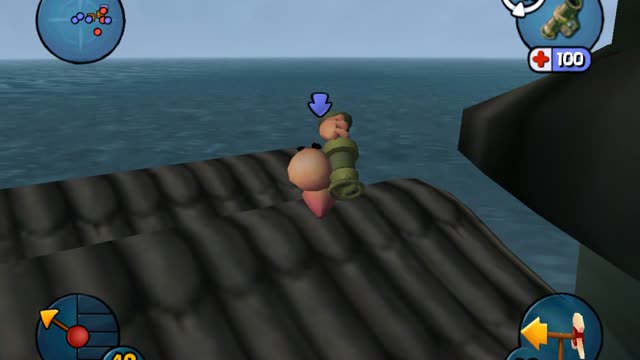
It is the sixth installment in the Worms series, and was released for GameCube, Mac OS X, Microsoft Windows, PlayStation 2 and Xbox. Notably, the game was the first in the series to be fully 3D.
How to Play Worms 3D
Here is the default control layout for Worms 3D in the RetroPlayers.Club Player. Open Controller Mapping in the app to reassign anything to your own keys or gamepad.
The Story Behind Worms 3D
The game was announced by Team17 in July 2002 as Worms 3. Additionally, it featured several new weapons, with some weapon operations being substantially different from previous Worms titles. In April 2003, the game was re-announced as Worms 3D.
Acclaim was due to release the Xbox version later on in the year, however they filed for Chapter 7 Bankruptcy at the end of August 2004, and so left the Xbox version without a publisher until Sega of America announced they had acquired the North American publishing rights to it and Worms Forts: Under Siege in January 2005., releasing on 1 March 2005, almost a year after the other versions. The game was eventually released in Europe at the end of the month. The Macintosh version was ported and released by Feral Interactive, releasing on 14 May 2004.
What You'll Play
Additionally, it featured several new weapons, with some weapon operations being substantially different from previous Worms titles. Gold medals usually unlock bonuses as for example maps, challenge missions, information about weapons, or voice banks. The Campaign consists of 35 small missions in which the player has to utilise their worms to complete a certain task, like destroy enemy worms, collect a certain crate, or even unique missions, such as having to detonate 16 hidden landmines in a certain time.
Worms 3D is a 2003 3D artillery turn-based tactical video game developed by Team17 and published by Sega, Acclaim Entertainment, and Feral Interactive. As in Worms 3Ds predecessors, the worms continue to fight using a wide range of conventional or droll weapons, including rockets, explosives, firearms, and air strikes, whilst also traversing the island using utilities when those items are available. The entire inventory is derivative of the game's immediate predecessors, but is noticeably simplified and lacks certain previously existed items, including digging tools such as the blowtorch.
Why It Still Hits
The Xbox, PC, and PlayStation 2 versions of Worms 3D received mixed reviews, but the GameCube version received fairly positive reviews. He said that rather than trying to "recreate" Worms itself, he would have preferred to start from scratch and build a 3D game containing the same qualities as the series. Worms 3D is a 2003 3D artillery turn-based tactical video game developed by Team17 and published by Sega, Acclaim Entertainment, and Feral Interactive.
Despite this, most reviewers criticized the 3D camera system that often places behind the objects in landscape with the worm being hidden in front of those and stiff controlling of the worm. Worms 3D won the Entertainment and Leisure Software Publishers Association silver award, indicating that the game sold at least 100,000 copies in the United Kingdom. It is the sixth installment in the Worms series, and was released for GameCube, Mac OS X, Microsoft Windows, PlayStation 2 and Xbox.
Worms 3D — Frequently Asked Questions
What console was Worms 3D released on?
Worms 3D was released for the Nintendo GameCube in .
Can I save my progress in Worms 3D?
Yes, with Premium: the app lets you save a state at any point in Worms 3D and resume from exactly there.
Where can I buy the original Worms 3D?
See the "Other Places You Can Get This Game" section below the article for legitimate places to buy real-world versions.
Do I need to download anything to play Worms 3D?
Worms 3D plays through the free RetroPlayers.Club Player app rather than in the browser, because the Nintendo GameCube needs the full power of your desktop. The preview above shows the actual game running.
This Game is Also Known As: “worms 3d game”, “worms 3d gamecube”, “worms 3d online”, “play worms 3d free”, “worms 3d play online”