Play Star Wars Force Combat Online Free for PC (Retro).
Star Wars Force Combat is a fan-made 3D one-on-one fighting game for Windows PC by Lastjawa, with 45 fighters from the Star Wars films and series and more than 45 stages. It plays on your desktop through the free RetroPlayers.Club Mini App.
Star Wars Force Combat
Play this Game The Right Way Now -> Download Our Mini App & Start PlayingThe RetroPlayers.Club Player is a Premium perk. Go Premium or sign in to play Star Wars Force Combat at full speed on your own PC.
Star Wars Force Combat can be relived on your own PC through the free RetroPlayers.Club Player app — full speed, with a controller and saves just like your hardware. You confirm you own the game from your library, and no need to connect your console.
🎮 USB or Bluetooth controller? Plug it in, Once Detected Click Here to Open Your Controller Options
| Action | Keyboard | Controller |
|---|---|---|
| Keyboard works out of the box; any USB or Bluetooth gamepad is detected automatically. | ||
🎮 PC (Retro) controls
These are the keys the RetroPlayers.Club Player app uses for PC (Retro), shown for reference. Your controller still lights up below so you can confirm it is detected — Premium members can remap here (keyboard or USB controller) and the app applies the map at the next launch.
No controller detected yet — plug one in and press any button.
Press buttons — your controller lights up here so you can see it is detected. Go Premium to save a custom map.
| Action | Keyboard | Controller |
|---|---|---|
| Up / Jump | W | D-Pad up |
| Down / Crouch | S | D-Pad down |
| Left | A | D-Pad left |
| Right | D | D-Pad right |
| Attack 4 / Back | J | Right face |
| Attack 3 / OK | K | Bottom face |
| Attack 2 | U | Top face |
| Attack 1 | I | Left face |
| Block | Q | Left shoulder |
| Throw | E | Right shoulder |
| Start / Pause | Enter | Start |
Report this game not working
First registered run claims the top spot. It won't stay easy for long.
Playing counts once you're signed in — register free in the player above.
How to Play Star Wars Force Combat
How to Play
Star Wars Force Combat runs on Windows, so it plays through the free RetroPlayers.Club Mini App on your desktop. Click Play on this page and the Mini App downloads the game (about 4.6 GB), sets it up and starts it for you. It is a large 3D game: it takes about 8.1 GB of disk space, and it loads everything before the title screen — on our test PC, with the game on a hard disk, that took about four minutes. A PC with 8 GB of memory or more and a dedicated graphics card is the place to play it; on our 2011 test laptop (GeForce GTX 560M) fights ran at 40 to 45 frames a second.
On the keyboard, W, A, S and D move, jump and crouch; I is 1, U is 2, K is 3, J is 4, E is Throw and Q is Block. Enter is Start and pauses a fight. In the menus K confirms and J goes back, and on a tower screen push Up once to move from Difficulty to the towers before you confirm. A USB controller plays too: the d-pad or left stick moves, the left face button is 1, the top is 2, the bottom is 3 and the right is 4, the left shoulder is Block, the right shoulder is Throw and Start pauses. Premium members can set their own keys and controller buttons in the Visual Controller Mapper on this page.
About Star Wars Force Combat
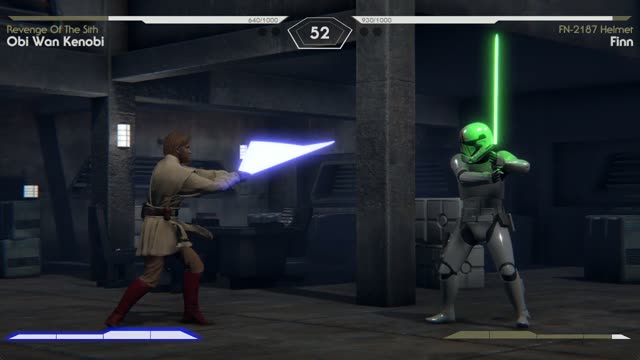
Star Wars Force Combat is a one-on-one fighter with full 3D characters and stages. Its own title screen reads Force Combat Beta, version 1.26. The fighter select screen holds 45 portraits — Luke Skywalker, Darth Vader, Obi-Wan Kenobi, Rey, Kylo Ren, Darth Maul, Anakin Skywalker, Princess Leia, Chewbacca, The Mandalorian and Lando Calrissian among them — and every fighter carries numbered skins. Some fighters and skins start locked and are earned by beating the towers; the game keeps what you unlock on your PC. Fights take place on more than 45 stages, from Rakata Prime, Hoth, Dagobah and Endor to Cloud City, Jabba’s Palace, Mustafar and the Carbon Freeze Chamber.
How It Plays
Each fighter has 1,000 points of health and a round runs on a 90-second clock. The game names its six buttons 1, 2, 3, 4, Throw and Block. Special moves are short direction sequences ending in an attack button — Darth Vader’s Saber Throw is Back, Forward, 1 — and stronger moves spend part of the bar under your fighter. Pause the game and choose Moves List for every move of the fighter you are playing, along with a short biography of the character.
Game Modes
Path Of The Force is a ladder of towers: the first, Learner, has 5 opponents and the next has 8, each at the difficulty you set. Movie Towers and TV Towers are themed ladders such as Light Side – Original Trilogy and Light Side – The Clone Wars. Versus offers Player vs Player on one PC or Player vs CPU, and Training Mode lets you practise against a standing opponent while the game lists every button you press on screen.
Credits
Star Wars Force Combat is the work of Lastjawa. It is a fan-made game, not an official Lucasfilm or Disney release: Star Wars and its characters are trademarks of Lucasfilm Ltd.
Star Wars Force Combat — Frequently Asked Questions
What is Star Wars Force Combat?
A fan-made 3D one-on-one fighting game for Windows PC by Lastjawa, with 45 fighters from the Star Wars films and series and more than 45 stages. Its own title screen reads Force Combat Beta, version 1.26.
Is this an official Star Wars game?
No. It is a fan-made game by Lastjawa, not an official Lucasfilm or Disney release. Star Wars and its characters are trademarks of Lucasfilm Ltd.
What kind of PC does it need?
A 64-bit Windows PC with 8 GB of memory or more and a dedicated graphics card. On our 2011 test laptop (GeForce GTX 560M) fights ran at 40 to 45 frames a second, and the first loading screen took about four minutes from a hard disk.
How big is the download?
About 4.6 GB to download, about 8.1 GB once it is set up on your PC.
Can I play with a controller?
Yes. A USB controller drives player one, and Premium members can set their own button layout in the Visual Controller Mapper on this page; the Mini App uses it the next time the game starts.
Can I play against the computer?
Yes. Path Of The Force, Movie Towers and TV Towers are ladders of computer opponents, and Versus has a Player vs CPU choice.
Can two people play?
Yes. Versus has Player vs Player on one PC: player two moves with the arrow keys and attacks with Home (1), End (2), Insert (3) and Delete (4), with Page Up to throw and Page Down to block.
How do I pick the opponent in Training Mode?
After you choose your own fighter, the second fighter is chosen with player two's keys: move with the arrow keys and press Insert.
Where is the move list?
Press Start (Enter on the keyboard) during a fight and choose Moves List to see every move of the fighter you are playing.
This Game is Also Known As: “star wars force combat game”, “star wars force combat online”, “play star wars force combat free”, “star wars force combat tournament”, “star wars force combat play online”